
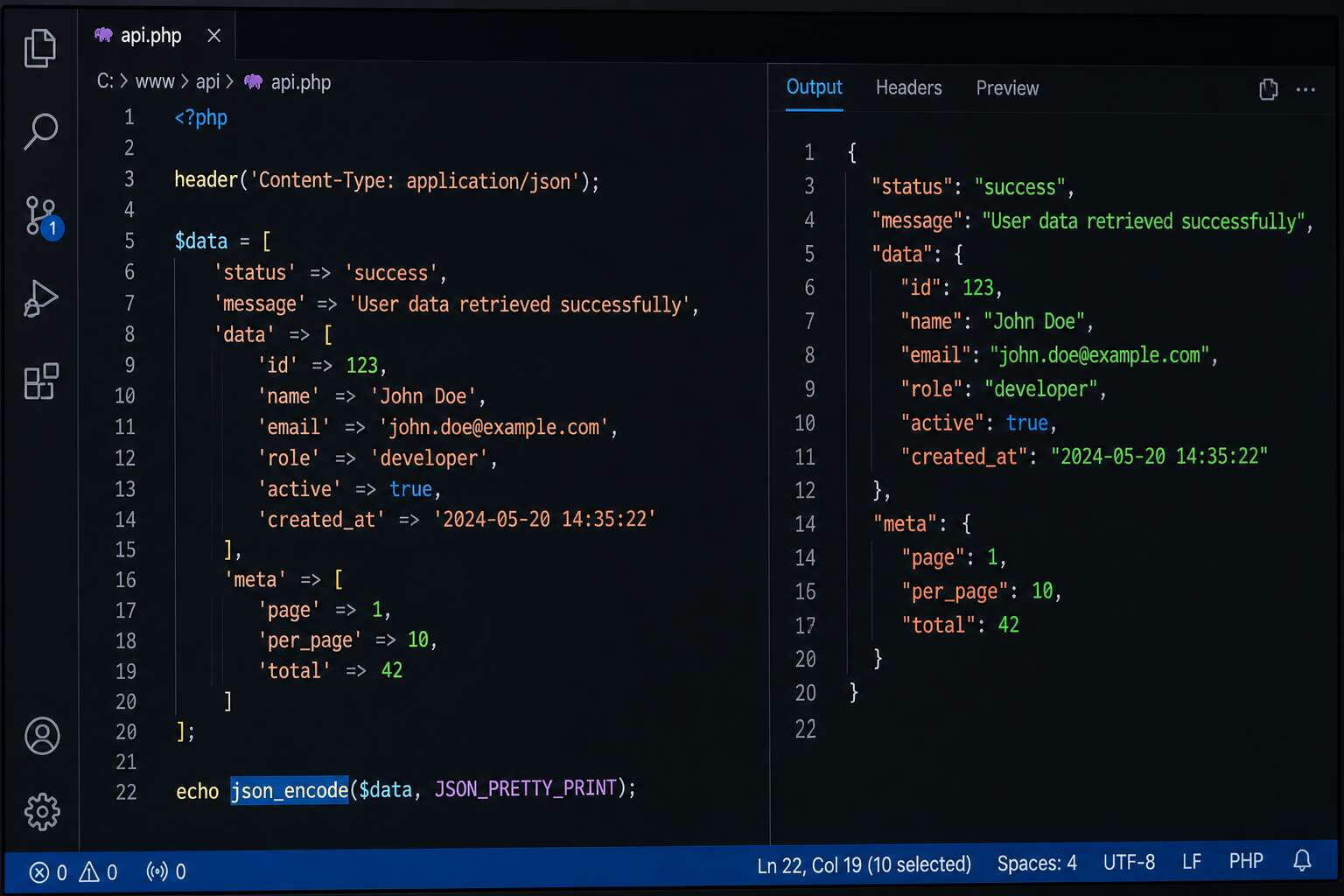
Understanding json_encode Basics
What Does json_encode Do?
The process of converting PHP arrays and objects into JSON strings feels deceptively simple. Yet this single function underlies most modern web APIs. When you call php json_encode on an array, PHP traverses the data structure, respects type casting rules, and produces a formatted string ready for transport.
The function respects booleans, integers, floats, strings, and nested structures. It also manages associative arrays as objects, which is where many beginners stumble. If you have ever watched a perfectly good array turn into an unexpected JSON object, you have already met this quirk.
Key behaviours worth noting:
- Numeric keys are converted to JSON object properties
- Associative arrays become objects with string keys
- Indexed arrays become JSON arrays with sequential values
Understanding these default behaviours matters because they determine how your data appears on the other side of a request. A developer building an API for eCommerce in Johannesburg, for instance, needs to know whether product categories arrive as arrays or objects before writing client-side logic. The distinction changes parsing strategies entirely. Working with php json_encode daily means memorising these patterns quickly.
The Syntax and Return Value
The syntax of php json_encode is compact: pass a value, optionally set flags, and a string comes back. Yet the return value is where caution pays off. Success produces a JSON string. Failure produces boolean false, a quiet trap for anyone who assumes every input will encode cleanly. Invalid UTF-8 sequences, excessive nesting beyond the depth limit, or attempting to encode resources all trigger false.
When working with php json_encode, always check the result before passing it onward. A false value can silently break an API response, leaving the client staring at an empty body. Quick mental checks help:
- Validate UTF-8 encoding on incoming text.
- Confirm the depth parameter matches your data structure.
- Exclude resource types from arrays or objects.
If you skip these steps, a single bad value in a large dataset can return false and waste hours of debugging. Treat the return value as part of your contract with the client, not an afterthought.
Supported PHP Data Types
PHP’s type system and JSON’s data types don’t line up perfectly. That mismatch is where php json_encode earns its reputation. I’ve seen developers assume every PHP value has a tidy JSON equivalent. They don’t. Strings encode to JSON strings, integers to numbers, booleans to true or false, and null to null. Simple enough.
But the subtlety appears when you work with arrays and objects. An indexed array becomes a JSON array. An associative array becomes a JSON object, which surprises developers who expect arrays to stay arrays. Objects encode by pulling their public properties into a JSON object, leaving private and protected properties behind. Resources refuse to encode at all and return false, which is why type checking before encoding matters. Working with php json_encode means knowing which types will produce valid output.
Encoding Strings and Unicode Handling
Strings form the bulk of most JSON payloads, yet their encoding trips up many developers. When php json_encode processes a string, it assumes UTF-8 input. If your data arrives in ISO-8859-1 or Windows-1252, the function returns false rather than mangled output. That strictness is a feature, though it feels harsh when legacy systems feed it old encodings.
By default, php json_encode escapes non-ASCII characters into uXXXX sequences. This guarantees safe transport across any system, but it makes debugging painful. You stare at u00e9 instead of é. The JSON_UNESCAPED_UNICODE flag changes that behaviour, producing readable output at the cost of requiring UTF-8 everywhere. I have lost hours to exactly this confusion!
Special characters also demand attention. The function automatically escapes:
- Double quotes
- Backslashes
- Control characters
This happens without complaint, which is why the function remains the standard for API responses.
Parameters and Options That Control Encoding
The Flags Parameter Explained
Most PHP developers treat the flags parameter as an afterthought, yet this single argument dictates whether your API returns readable data or cryptic escapes. I have seen production outages caused by a missing JSON_UNESCAPED_SLASHES flag. The flags parameter in php json_encode is where the real control lives.
Several constants shape the output:
- JSON_PRETTY_PRINT adds whitespace for human inspection.
- JSON_UNESCAPED_UNICODE keeps characters like Zulu names intact.
- JSON_NUMERIC_CHECK converts numeric strings to numbers.
Each flag changes the byte stream, not just the appearance. For South African developers dealing with multilingual content, choosing the right combination matters. The flags parameter can also suppress errors. JSON_THROW_ON_ERROR turns silent failures into catchable exceptions. Master those constants and php json_encode becomes predictable, reliable, and genuinely powerful!
JSON_HEX_TAG, JSON_HEX_AMP, and Other Hex Flags
A single unescaped ampersand can derail a rendered page or open a script injection hole. PHP’s json_encode offers hex flags designed to neutralize these hazards before the browser ever sees the output. JSON_HEX_TAG converts angle brackets into unicode escape sequences. JSON_HEX_AMP handles ampersands. JSON_HEX_APOS and JSON_HEX_QUOT protect single and double quotation marks.
These options matter most when your API response is embedded directly inside an HTML script block. Raw characters can be interpreted as markup, but hex escapes become inert ASCII text. The distinction is subtle and essential.
- JSON_HEX_TAG escapes `<` and `>`
- JSON_HEX_AMP escapes `&`
- JSON_HEX_APOS escapes `’`
- JSON_HEX_QUOT escapes `”`
South African teams handling user comments, form data, or external API payloads should treat these constants as a first line of defense. php json_encode with hex flags turns unpredictable input into safe bytes, not merely prettier output.
Pretty-Printing with JSON_PRETTY_PRINT
JSON_PRETTY_PRINT transforms what looks like a single, dense line of text into a structured, readable tree. When you pass this flag to php json_encode, the function adds indentation and line breaks. The data does not change; the formatting does.
Readability costs bytes. Less compressed output means larger responses, so do not enable it in production endpoints unless you have a specific reason. Use it for logs, API consoles, and any place a human needs to inspect the result quickly.
Other flags also influence presentation:
- JSON_UNESCAPED_SLASHES leaves forward slashes alone instead of escaping them.
- JSON_UNESCAPED_UNICODE outputs actual characters rather than u sequences.
- JSON_PRESERVE_ZERO_FRACTION keeps decimals intact.
Combining these with JSON_PRETTY_PRINT gives you full control over how php json_encode presents data.
Handling Numeric Strings with JSON_NUMERIC_CHECK
Every data feed contains a hidden mix of types. Phone numbers, prices, and ID codes are so often carried over as digit-bearing strings. Use the JSON_NUMERIC_CHECK flag, and php json_encode converts those numeric strings into real integers and floats during encoding. This results in smaller payloads and, more importantly, data that frontend JavaScript can consume without an extra type conversion.
The rule is simple, but PHP defines exactly what counts as numeric. The string “12345” becomes integer 12345. A price of “19.99” becomes float 19.99. Yet “0450” becomes 450 because the leading zero is ignored. Any value with commas, spaces, or letters around digits stays a string, because PHP sees no valid number syntax.
- Only strings that match PHP numeric syntax are converted.
- Text and alphanumeric values remain untouched.
- Exponential notation such as “1e5” becomes a float.
I reach for this flag when the receiving application checks types strictly. It avoids the dance of mapping strings to numbers on the front end. Just remember, PHP numeric rules may differ from expectations inside another language. Inspect the source strings before enabling this option in a busy php json_encode workflow.
Managing Slashes and Unicode with JSON_UNESCAPED_SLASHES and JSON_UNESCAPED_UNICODE
Every forward slash in a URL arrives escaped under default encoding. php json_encode converts slashes to / to guard against certain injection risks, which is safe but makes every endpoint string harder to read. The JSON_UNESCAPED_SLASHES flag keeps slashes exactly as they appear in your source data.
Unicode follows a similar pattern. Without flags, characters like à or ís become u00e0 escape sequences. JSON_UNESCAPED_UNICODE keeps them as readable UTF-8, which matters when your data includes South African place names or user-generated content in multiple languages. Cleaner output, smaller payloads, and less mental parsing when you inspect the encoded result.
Advanced Flags for Object and Array Conversion
Beyond readability, php json_encode offers flags that reshape output structure itself. Most developers assume arrays and objects encode identically, but they do not. PHP arrays become JSON arrays only when keys are sequential integers, otherwise they become objects. The JSON_FORCE_OBJECT flag upends this rule. It forces every array, including empty arrays, to encode as a JSON object with numeric property names. This is essential when an API contract requires `{}` instead of `[]`. Another structural flag is JSON_PARTIAL_OUTPUT_ON_ERROR, which encodes the usable parts of broken data and substitutes invalid UTF-8 or malformed values with null.
Common structural flags you will actually reach for:
- JSON_FORCE_OBJECT converts indexed arrays into objects, preserving key order.
- JSON_PARTIAL_OUTPUT_ON_ERROR keeps the encoding process alive when one value fails.
With php json_encode, matching the exact shape your frontend expects prevents silent type mismatches.
Common Use Cases and Practical Examples
Converting Arrays to JSON for AJAX Responses
Every modern web application eventually hits the same moment: a browser sends an asynchronous request, and the server must return parseable data. That data starts as a PHP array, pulled from a database, a session, or an API cache. php json_encode converts that array into a JSON string in one line. No manual string concatenation required!
The practical execution stays direct. Query the records, bundle them into an array, pass it to php json_encode, then emit the result. The JavaScript fetch call receives a structured payload immediately. Error handling follows the same route. A status key and a message key encode into a JSON object the frontend can branch on. Frequent AJAX conversions include:
- Form validation results for a modal
- User lists for a search bar
- Cart totals after an item update
The conversion pattern remains identical across all of them.
Encoding Objects and Database Results
A single PHP object can hide a labyrinth of private properties, yet `php json_encode` keeps its composure. Take a fetched database row, mapped into a typed entity, or even a simple `stdClass` assembled on the fly. The encoder reads the accessible state and renders it into a flat, translatable JSON object without you mapping each field by hand. I have seen this save hours when dealing with nested joins and aggregated columns. The result preserves the same structure your backend uses, which makes debugging less opaque and frontend consumption effortless.

Everyday examples of this pattern include:
- User profile objects from an auth library
- Product records with associated category data
- Geospatial coordinates returned by a mapping service
The method stays the same regardless of the source. You adjust the property visibility, pass the instance, and emit the payload. There is no need to strip the object into an array first. The conversion simply respects the public surface. I find that feature quietly powerful. It carries the object’s intent across the HTTP boundary with minimal ceremony.
Embedding JSON in HTML or JavaScript
Embedding JSON into the HTML stream turns a page into a self-contained data carrier. The moment a script tag holds your payload, the browser has everything it needs without a second request. This matters for South African readers on variable connections, where every round trip costs time and patience.
The trick lies in surviving the markup itself. php json_encode with JSON_HEX_TAG keeps closing script tags honest, and JSON_HEX_AMP preserves query strings inside attributes. Applied together, the flags prevent the classic broken-page drama before it starts.
Common scenarios where this approach shines:
- Initializing chart data for a live dashboard
- Passing route definitions to a client-side router
- Injecting user preferences into a settings panel
The pattern stays the same each time. Encode once, inject deliberately, and let the frontend consume the result without ceremony. It is the quiet workplace of the web, dependable and seldom noticed until something goes wrong.
Building Nested JSON Structures
Two layers of data start simple: a team, then the team members. But when each team member brings their own list of devices, and every device carries its own status history, you have a tree that needs to stay intact. php json_encode takes that nested array and converts the whole depth into a single JSON object. No hand built tokens, no fragile string splicing.
The structures that fit hardest:
- A quote builder where a division holds products, and each product holds its own array of price notes and delivery exclusions.
- A fleet dashboard with one list of routes, where each route contains stops and each stop has a small log of delay records.
- A user permission module where a role points to an array of access keys, and those keys describe areas per module.
When the nested array is assembled cleanly before the call, php json_encode preserves the levels without a single missing comma. It does not repair your structure, it just respects what you already built. The more levels you prepare, the more the encode makes itself useful for South African dashboards that need every piece in one response.
Encoding Associative Arrays vs Indexed Arrays
The first decision in any PHP payload is whether the output should be an ordered list or a labelled map. Indexed arrays become JSON arrays, while associative arrays become JSON objects. The shape you hand to php json_encode is the shape you get back, so the structure must be deliberate before the function runs.
A KwaZulu-Natal logistics board shows why this matters. A list of delivery stops is best encoded as an indexed array, because order is the only meaning. A warehouse map, pairing stock codes with bin locations, works better as an associative array, because the key carries the context.
- Indexed arrays for time series data and step sequences
- Associative arrays for records tied to entity identifiers
Neither approach is heavier to build. The real work is keeping the source array consistent, since php json_encode will not reclassify a mixed array. In my own projects, I test the output early, because the function preserves the levels and the types exactly as written.
Error Handling and Debugging json_encode
Common Errors and Why They Occur
A silent white page or a `null` response is the most common sign that `php json_encode` has stumbled. The function rarely throws an exception, it simply returns `false` and leaves you to investigate. More often than not, the culprit is a malformed UTF-8 string hiding deep within your data. When a character sequence isn’t valid UTF-8, the encoder refuses to process the entire payload, not just the offending byte. I have spent hours chasing this only to find a stray character from a legacy database import.
Another frequent issue involves recursion. When you try to encode an object that contains a reference back to itself, circular references cause the encoder to fail. The logic is defensive, it would rather give up than get stuck in an endless loop. There is also the issue of resource types, such as file handles or database connections, which cannot be serialized to JSON at all. These will produce an error that is not immediately obvious.
To get to the bottom of any failure, you should rely on introspection. The best course of action is to check the return value and then retrieve the exact error message.
- Start by using `json_last_error_msg()` to get a human readable explanation.
- Implement a check for `json_last_error()` immediately after the encoding call.
- Consider using `JSON_INVALID_UTF8_SUBSTITUTE` to replace bad characters instead of failing.
- Use `JSON_PARTIAL_OUTPUT_ON_ERROR` to capture the data that was successfully encoded before the failure.
The distinction between a syntax error and a logic error is important. Syntax issues, like a nested function call that returns a resource, are blatant. Logic errors, however, are subtle, such as encoding `INF` or `NAN` which results in `false` rather than a numeric representation. Professional work hinges on knowing that these failures are silent by design, so your own code must provide the noise. Always assume the encoding will fail, and write your implementation to prove that it didn’t.
Using json_last_error() to Identify Problems
Error handling with php json_encode is a matter of reading silence. The function returns false for both a boolean false and a complete failure, so the return value alone cannot distinguish them. Call json_last_error() immediately after encoding to get the numeric error code. Then use json_last_error_msg() for a human readable explanation. I keep these two together, because one provides the category and the other the detail.
A practical sequence looks like this:
- Assign the output to a variable.
- Check
json_last_error()before any other JSON function runs. - Log the message from
json_last_error_msg().
This routine turns a silent failure into a traceable event. Without it, php json_encode returns false for many different reasons, and you have no way to tell them apart. The error state is overwritten by the next JSON operation, so check it while the clue is still fresh.
Checking for JSON Encoding Failures
Debugging php json_encode requires attention to the data itself, not just the error code. A failed encoding often traces back to a recursive array or an invalid UTF-8 sequence buried deep in the structure. I have found that inspecting the input with a recursive validator before encoding saves hours of frustrated searching.
There are several culprits worth checking first:
- Values containing invalid UTF-8 characters
- Objects with circular references
- Strings with unescaped control characters
Each of these produces the same false return value. The error code tells you the category, but the source is usually in the data. I prefer to write a small test harness that feeds known inputs through php json_encode and compares the output against expected JSON strings. This catches subtle issues before they reach production.
The real challenge is that php json_encode will happily encode many unusual structures. The question is whether your application can decode them again on the other side. That is the deeper failure mode worth debugging.
Debugging Invalid UTF-8 Characters
Invalid UTF-8 accounts for a meaningful share of silent php json_encode failures. When input contains stray bytes from a legacy charset, the function returns false with no visible warning. This is not a structural problem. The JSON is syntactically sound, but the byte sequence violates the specification.
I frequently encounter this with data lifted from older databases or third-party feeds. One corrupted character in a street name or surname can halt an entire response. The output appears as an empty string, and the real cause remains obscured at the byte level.
A typical debugging session moves through three steps:
- Isolating the offending string.
- Running utf8_encode() or a conversion routine.
- Retesting the encoded result.
Debugging php json_encode ultimately requires patience with raw data, not frustration with the function itself.
Performance Considerations and Optimization
Impact of Large Data Sets on Encoding Speed
Performance considerations often surface when developers encode large arrays. The encoding speed of php json_encode depends on both data volume and structure. Huge associative arrays require more processing time, while nested objects can slow things down noticeably.
For example, I have seen memory usage spike with sizable datasets. Three factors matter most here:
- Data size and nested depth
- UTF-8 validation overhead
- Flag combinations like JSON_PRETTY_PRINT
Monitoring these elements helps avoid bottlenecks during peak traffic. Even so, php json_encode remains reliable under demanding loads.
Memory Usage and Avoiding Recursion Limits
Memory usage often catches developers off guard when encoding large datasets. PHP copies arrays by value, so nested structures consume more memory than a quick variable check suggests. Using json_encode on a reference to a sizable object can still double the allocation during peak operations.
Recursion limits are another quiet failure. PHP’s default depth of 512 stops encoding of deeply nested data with a fatal error. I have watched this happen during a routine e-commerce export, no warning, just a blank page and a log entry.
- Call gc_collect_cycles() before encoding to clear stale references
- Serialize smaller chunks instead of one massive php json_encode call
- Check memory_get_peak_usage() after each batch
Shared hosting in South Africa often imposes strict memory caps. Knowing where these boundaries sit helps you plan around them.
Caching Encoded JSON for Repeated Use
A single API endpoint may encode the same data hundreds of times per hour, wasting CPU. Caching encoded JSON turns this into one calculation. Replace repeated php json_encode calls by storing the final string in memory or a key-value store. Build once on the first request, then pull the cached string. When data shifts, invalidate with a versioning key or dirty flag. For small payloads, an array works, but for larger ones, Redis avoids bloat.
The payoff shows under load. A typical Symfony app slicing 30% off response time by serving cached JSON from memory. That matters on shared hosting with strict memory caps. Order your cache by specificity:
- Cache by URL and parameter hash to separate distinct requests.
- Set a TTL based on how volatile the data is.
This cuts redundant php json_encode calls, but a stale string lingers.
Comparing json_encode with Serialization
When performance is the yardstick, php json_encode faces a worthy competitor in PHP’s native serialize() function. Serialization preserves object types and internal references, giving it an edge when round-tripping complex data within one application. json_encode produces a lean, standard payload that any HTTP client can read.
Benchmarks show serialize() often edges ahead on raw speed, especially with deep object graphs. That advantage disappears the moment another service needs the data. JSON needs no custom unserialize handler and avoids the security risks of object injection.
The destination determines the winner:
- Internal queues and cache stores: serialize() does fine.
- Public endpoints and browser-side consumption: php json_encode wins outright.
Alternatives, Best Practices, and Security Tips
When to Use json_encode vs Other Methods
Approximately 80% of web applications rely on JSON for data interchange, yet most developers never question the default behaviors of php json_encode. Your choice between this function and manual serialization often determines whether your API survives a hostile request or crumbles into a cryptic error. When performance matters, json_encode outperforms hand-rolled string concatenation by several orders of magnitude. For best practices, always specify the flags parameter explicitly, even if you only need JSON_UNESCAPED_SLASHES. This prevents silent behavior shifts across PHP versions.
Security demands vigilance. The function does not sanitize data, it merely encodes it. An encoded string can still execute if embedded directly into a “ tag without hex escaping. Enable JSON_HEX_TAG, JSON_HEX_AMP, and JSON_HEX_APOS simultaneously for any output destined for inline HTML. Consider the following attack vectors:
- DOM-based XSS through unescaped “ or “ sequences
- Data exfiltration via unencoded U+2028 and U+2029 line separators passing through JavaScript parsers
- Recursion depth exploits when encoding deeply nested circular structures
Modern PHP 8.1 introduced JSON_PARTIAL_OUTPUT_ON_ERROR, which returns partial data rather than failing on invalid UTF-8. Use this flag only when you understand the data integrity tradeoffs. For huge datasets exceeding memory limits, streaming with `json_encode()` in chunks beats single-shot encoding every time.
Best Practices for Consistent JSON Output
Consistent output from php json_encode requires deliberate choices, not defaults. Many developers treat this function as a black box, but its behavior shifts subtly across PHP versions. The JSON_UNESCAPED_SLASHES flag, for example, changes how URLs appear in your payloads, which can silently alter API contracts between environments.
Consider an alternative approach: wrapping json_encode in your own middleware layer. This wrapper sets explicit flags, handles date objects before encoding, and logs failures through json_last_error(). This pattern gives you a single point of control, making debugging far less painful when a third-party endpoint rejects your payload.
Security demands equal attention. Encoded output destined for inline HTML should use JSON_HEX_TAG, JSON_HEX_AMP, and JSON_HEX_APOS together. Without these, an encoded string containing “ can break out of its context and execute malicious code. Also consider U+2028 and U+2029 line separators, which survive encoding and can corrupt JavaScript parsers.
- Always test encoded output with sample hostile inputs
- Verify how your framework handles the final string
- Stream large datasets in chunks to reduce memory spikes
For large payloads, encoding in chunks with php json_encode beats single-shot attempts, especially when memory limits loom. The function remains a tool, not a fix. Its output reflects your discipline in setting flags, sanitizing inputs, and understanding the data you feed it. That discipline separates reliable systems from fragile ones.
Security Considerations: Preventing XSS via JSON
From Johannesburg to Cape Town, the same XSS pattern appears in code reviews: a php json_encode call returns a string, and the risk lives in where that string lands. Inline JavaScript treats U+2028 and U+2029 as line terminators, so a clean payload can break your script without a single angle bracket. The hex flags help, but they cover a limited set of attack surfaces.
I validate input before encoding ever starts. mb_check_encoding() filters invalid UTF-8 early, and I whitelist every key on associative arrays built from user submissions. When the result must sit inside an HTML attribute, I apply extra escaping after encoding because php json_encode cannot know your markup. Consider these habits:
- Reject unknown fields before building the payload
- Escape “</script>” explicitly even when hex flags are set
- Use JSON_THROW_ON_ERROR so failures surface in logs
- Test each payload inside a real browser’s parser
Alternatives to native encoding exist, such as Symfony Serializer and LaminasJson, both of which add typed error handling and strict traversal rules. For most projects, php json_encode with explicit flags and disciplined input handling prevents XSS without abandoning the standard library.
Handling Special Characters and User Input
Native encoding remains the default for many developers, but libraries such as Symfony Serializer and LaminasJson present structured alternatives to php json_encode. Each brings a different approach to the same problem:
- Symfony Serializer relies on normalizers and denormalizers to convert objects before encoding.
- LaminasJson offers its own encoder with strict traversal rules and error reporting.
These packages add typed error handling and normalization layers that the native function lacks. For projects with complex object graphs or strict API contracts, they reduce guesswork. For straightforward payloads, php json_encode still wins on speed and simplicity.
Best practice starts with input validation before any encoding step. I run mb_check_encoding() on incoming strings to catch invalid UTF-8 early. I also whitelist keys on associative arrays built from user submissions, so unknown fields never reach the encoder. When special characters must survive the trip, hex flags such as JSON_HEX_TAG and JSON_HEX_AMP cover common cases, but they do not make the output safe for every context. A payload destined for an HTML attribute needs extra escaping after encoding, because php json_encode cannot know your markup.
Security tips for special characters and user input come down to discipline. Use JSON_THROW_ON_ERROR so silent failures surface in logs. Test each payload inside a real browser parser, not just in a console. And when you need to embed output inline, reject unknown fields before building the payload and escape script closers explicitly.
Version-Specific Features and Deprecations
Beyond php json_encode, most payloads stay simple enough to handle natively. I keep the core encoder until the object graph becomes too tangled for flags, then I drop in a serializer layer for strict contracts. That separation works well for my projects today. I also read every PHP changelog, because version shifts change which constants exist.
- PHP 7.3 added JSON_THROW_ON_ERROR, which throws an exception instead of returning false.
- PHP 7.2 added JSON_INVALID_UTF8_IGNORE and JSON_INVALID_UTF8_SUBSTITUTE.
- PHP 7.1 added JSON_UNESCAPED_LINE_TERMINATORS to preserve line breaks.
Security always comes first. I validate incoming strings with mb_check_encoding() and whitelist associative array keys before building the payload. After encoding, I escape script closers for HTML, because php json_encode cannot know my markup. Then I open the browser’s parser and inspect the actual output yourself. That display check catches what the console misses.

